logo
EverydayChaos
Everyday Chaos
Too Big to Know
Too Big to Know
Cluetrain 10th Anniversary edition
Cluetrain 10th Anniversary
Everything Is Miscellaneous
Small Pieces cover
Small Pieces Loosely Joined
Cluetrain cover
Cluetrain Manifesto
My face
Speaker info
Who am I? (Blog Disclosure Form) Copy this link as RSS address Atom Feed

January 22, 2016

Good luck with the snow, my southern friends

I just got off the phone with a friend in DC where a couple of days ago one inch of snow caused 6-hour tie-ups, causing some people to abandon their cars. Now the city is expecting a record thirty inches (or what we in Boston call, “Oh, it looks like it may have snowed overnight”). Residents are being told to expect power outages.

Best of luck to you all. You have New England’s sympathies. (And you also have an offer of help from Boston’s mayor.)

At least we can look forward to the Republican snowball fight in Congress to prove that global warming is a myth.

Tweet
Follow me

Categories: misc Tagged with: fucking snow • global warming • snow • weather Date: January 22nd, 2016 dw

1 Comment »

January 16, 2016

Getting the path from the Dropbox API

Suppose you’re using the Dropbox API to let a user choose a file from her Dropbox folder and open it in your application. Dropbox provides a convenient widget — the Chooser — you can more or less just drop into your Web page. But…suppose you want to find out the path of an item that a user opens. For example, you want to know not only that the user has opened “testfile.txt” but that it’s “Dropbox/testfolder/TestA/testfile.txt”. The chooser only tells you the link is something like:

https://www.dropbox.com/s/lry43krhdskl0bxeiv/testfile.txt?dl=1

Figuring out how to get that path information took me /for/ev/er. I know it shouldn’t have, but it did. So, here’s how I’m doing it. (As always, please try not to laugh at my efforts at coding. I am an amateur. I suck. Ok?) (I owe thanks to Andrew Twyman at Dropbox who went out of his way to help me. Thanks, Andrew! And none of this is his fault.)

The way to get the path is explained in Dropbox’s API documentation, but that documentation assumes I know more than I do. Dropbox also provides an API Explorer that lets you try out queries and shows you the code behind them. Very helpful, but not quite helpful enough for the likes of me, because I need to know what the actual PHP or JavaScript code is. (It’d be easier if I knew Python. Someday.)

So, here’s roughly how I got it working. I’m going to skip some of the preliminaries because I went through them in a prior post: how to register an app with Dropbox so you can embed the Dropbox Chooser that lets users browse their Dropbox folders and download a file.

That prior post included code that initializes the Chooser. I want to add a single line to it so we can get the pathname of the downloaded document:

1

var opts= {

2

success: function(files) {


3

var filename = files[0].link;

4

filename = filename.replace(“dl=0″,”dl=1”);

5

$(“#filenamediv”).text(files[0].name);

6

alert(filename);

7

$.ajax({

8

url: “./php/downloadDropboxContents2.php”,

9

data: {src : filename},

10

success: function(cont){

11

$(“#busy”).show();

12

openOpmlFile_File(filename);

13

$(“#busy”).hide();

14

setCookie(“lastfile”,”/php/currentFile/” + filename);

15

getDropboxPath(filename);


16

},

17

error: function(e){

18

alert(e.responseText);

19

}

20

});


21

},

22

multiselect: false,

23

extensions: [‘.opml’],

24

linkType: “download”

25

};

26

var button = Dropbox.createChooseButton(opts);

27

document.getElementById(“uploadDB”).appendChild(button);

When a user chooses a file from Chooser, the “success” function that starts on line 10 is invoked. That function is passed information about the files that have been opened by the user in an array, but since I’m only allowing users to open one file at a time, the information is always going to be in the first and only element of that array. That information includes something called “link,” which is a link to the file that does not include the path information. So, in line 15 — the only new line — we’re going to pass that link to a function that will get that elusive path.

1

function getDropboxPath(link){

2

$.ajax({

3

type: “POST”,

4

beforeSend: function (request)

5

{

6

request.setRequestHeader(“Content-Type”, “application/json”);

7

},

8

url: “https://api.dropboxapi.com/2/sharing/get_shared_link_metadata?authorization=Bearer [INSERT YOUR AUTHORIZATION CODE]”,

9

data: JSON.stringify({url : link}),

10

success: function(cont){

11

alert(cont.path_lower);

12

},

13

error: function(e){

14

alert(e.responseText);

15

}

16

});

17

}

This is another AJAX call; it too assumes that you’ve included jQuery. (See the prior post.)

Now, how does this work. Well, I’m not entirely sure. But it’s sending a request to the Dropbox API. It’s doing this as a standard http web call, which means (I think) that you have to include metadata that web servers expect when you’re using http. (I could be wrong about this.) So, in line 6 you tell it that you are expecting to get JSON back, not a standard Web page. (JSON is a standard way of encoding human-readable, multipart information.)

In line 8 you’re constructing the URL you’re going to send your request to. Everything up to the question mark is simply the URL of the Dropbox API for getting metadata about a link. After the question mark you’re telling it that you’re authorized to make this request, which requites getting an authorization code from Dropbox. I’m probably cheating by using the one that the API Explorer gives you, but it works for now so I’ll worry about that when it breaks, which will probably be the next time I use it. Anyway, you need to insert your authorization code where it says “insert your authorization code” in all caps.

Line 9: The data is the internal link that the Chooser gave you as the URL of the file the user downloaded. I use JSON.stringify because it didn’t work until I did.

Line 10 is what happens when your query works. You’ll get an object from Dropbox that contains several different pieces of info. You want the one called “path_lower,” presumably because it gives you the path that is lower on the great Tree of Files that is a Dropbox folder. [LATER THAT DAY: Andrew tells me it’s actually called path_lower because it’s the path in all lower case, which is useful because the Dropbox file system is case insensitive. Frankly, I prefer my explanation on poetic grounds, so we’ll have to agree to disagree :)] Line 11 gets that path (cont.path_lower) and pops it into an alert box, which is almost certainly not what you actually want to do with it. But this is a demo.

That’s it. If you have questions, try to find someone who understands this stuff because I got here through many trials and even more errors.

Good luck.

Tweet
Follow me

Categories: misc Tagged with: api • dropbox • javascript Date: January 16th, 2016 dw

3 Comments »

January 9, 2016

Netflix’s hidden categories

The redditor makeinstallposted to PasteBin an HTMLized version of a list of hidden categories at Netflix that was the subject of a reddit thread. I’ve posted it as a Web page with links.

As you’ll see, Netflix has thousands of categories it uses internally. These are like the ones it lets you browse but more specific. This list will take you to a page at Netflix where you can browse among these micro-categories.

Tweet
Follow me

Categories: misc Tagged with: lists • netflix Date: January 9th, 2016 dw

6 Comments »

January 7, 2016

B12 helped my memory?

I’m 65 so I forget where I put my car keys and then remember that they’re in the ignition. And that I’m driving.

Well, no, it’s not that bad. But you know that thing where you click on your browser to look something up, you see what’s already loaded, and then it takes a minute to remember what you went there for? That was getting worse, and it was annoying.

I asked my doctor about it. It turns out that my B12 levels were scraping right along the minimum acceptable level — 181pg/ml is the minimum recommended (at least on the test results document I get) and I was at 190, and occasionally a bit lower. So at my doctor’s suggestion I started taking a supplement every day. That was about a year ago. My B12 levels are now 624 (914 is the highest recommended).

I have no external measurement of my short-term memory to go by, but it seems to me to be much better. Not perfect. I still won’t remember your name. But much better.

I ain’t no stinkin’ medical professional, but you can get B12 without a prescription. Best of all, if you take too much, you will pee a cheerful yellow.

By the way, my B12 levels might have been low because I’ve been a vegetarian for 35 years. There’s B12 in eggs and diary, but I probably wasn’t paying enough attention. (See my post about Soylent.)

Tweet
Follow me

Categories: misc Tagged with: health Date: January 7th, 2016 dw

2 Comments »

December 27, 2015

Embedded endnote extractor

I’ve updated a 2009 utility that lets you embed your end notes in the text you’re typing. The utility, Footnoter, extracts the endnotes, leaves a footnote number, and compiles a list of the endnotes with numbers and links. It now works with Markdown as well as with HTML; I use Markdown for most of what I write these days.

In other words, let’s say you type this in a document you’re creating with Markdown:

I write using Markdown. ((See John Gruber’s Daring Fireball for more.)) Markdown lets you embed formatting codes into plain text that are then rendered into formatted HTML, Word, etc.((The Marked app adds a viewer with export capabilities. It’s on sale for $9.99 right now.)), enabling me to focus purely on what I’m saying. It also lets me keep my fingers on the keyboard.

If you paste this text into Footnoter and tell it you want Markdown output, it will treat the comments between the double parentheses as endnotes. It will remove those comments from the body of the text, leaving the Markdown code for an endnote number, and will compile a list of endnotes with the proper references back to their endnote numbers. That is, it does what you would expect. At least with my limited testing.

For Markdown, that means the above text gets turned into this:

I write using Markdown.[^fn2] Markdown lets you embed formatting codes into plain text that are then rendered into formatted HTML, Word, etc.[^fn3], enabling me to focus purely on what I’m saying. It also lets me keep my fingers on the keyboard.

[^fn2]:See John Gruber’s Daring Fireball for more.
[^fn3]:The Marked app adds a viewer with export capabilities. It’s on sale for $9.99 right now.

Don’t be freaked out. That’s what endnotes look like in Markdown. When you run them through a parser, they’ll have appropriately numbered superscripts. (Footnoter generates arbitrary unique Markdown labels for endnotes; they start with “fn” and then have numbers appended sequentially. Those numbers have nothing to do with the number the parser will assign to the endnote itself. Also, yes, it’s a little bug that Footnoter starts with fn2 instead of fn1. Non-critical. I’m working on it. [Minutes later]: Fixed it. I think.)

The same thing happens if you are writing HTML except the markup that’s generated is more like this:

I write using Markdown.<span class=’fn_in_text’><a name=’fn2′><a href=#fnend2>2</a><</span> Markdown lets you embed formatting codes into plain text that are then rendered into formatted HTML, Word, etc.<span class=’fn_in_text’><a name=’fn3′><a href=#fnend3>3</a></span>, enabling me to focus purely on what I’m saying. It also lets me keep my fingers on the keyboard.

And that gets rendered in a browser as this:

I write using Markdown.2 Markdown lets you embed formatting codes into plain text that are then rendered into formatted HTML, Word, etc.3, enabling me to focus purely on what I’m saying. It also lets me keep my fingers on the keyboard.

There are a number of options, including setting the delimiters for endnotes and, for HTML, which endnote number to begin with. By default it removes the space before an endnote, so you can put a space between the word where the superscript should be and your delimiters, making your text easier to read when you’re working on it.

Also, if you work on a text, run it through Footnoter, work on it some more and add more endnotes, Footnoter should detect that and begin its arbitrary numbering of Markdown endnotes above where you left off. That means you can run it through more than once and it should still work.

Should.

Note: This code is from 2009. I’ve learned some stuff since then, including that jQuery makes life easier. When I added the Markdown option yesterday, I didn’t bother cleaning up the old code. It is particularly hideous. You can gape at its uglinesss at github.

PS: Yes, I really should have named it “Endnoter.”

Tweet
Follow me

Categories: misc Tagged with: endnotes • markdown • programming • utilities Date: December 27th, 2015 dw

Be the first to comment »

December 6, 2015

Shabbos in Ahmedabad

My wife and I are in Ahmedabad where there was a library conference put on by the Indian Institute of Management. It ended on Friday. We had Saturday plus this morning to see what we could of this very large city.

Friday night was our first day without sleeping pills, and we hardly slept at all — up for the night at 1:30am. Since I was already sick, having caught Ann’s cold, and being a self-pitying weakling, I just wanted to stay in bed and sleep. Which is pretty much what I did for the morning and early afternoon.

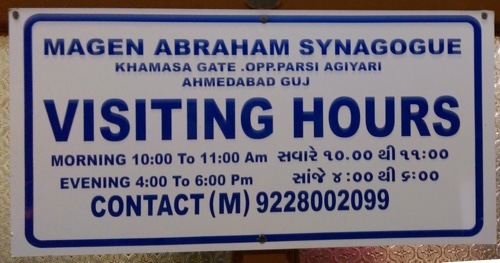
At 3pm we set out to walk to the walled city. We figured we’d go to a beautiful Hindu temple there (Swaminaryan Mandir) , and then walk 15 mins to the only Jewish synagogue in the entire region, Magen Abraham.

It is about a 4 mile walk to the Hindu temple, but it took us over three hours because Ahmedabad has blown past the infrastructure for walking. “ Chaotic traffic and people busy with their lives”It is difficult to describe how overwhelming it is. We walked along main roads with sidewalks made impassable by parked motorcycles. We walked through some very poor neighborhoods, where people smiled at us elderly Americans, and called out “Hallo.” Mainly, though, we walked along streets filled with chaotic traffic and people busy with their lives.

And don’t get me started on the traffic. Huge streets with cars, tuktuks, motorcycles, bikes, carts, and anything else that is capable of movement, all without traffic lights Horns replace lanes. The balletics required to make a right turn on a major street with no regulation other than norms and horns are astounding. Crossing a street requires stepping into a lane with the confidence that the oncoming traffic will split around you. Hesitate and you have become a random vector and far more likely to be hit. It is terrifying. Why 40% of the population hasn’t been killed in traffic accidents is one of today’s modern mysteries. “Why 40% of the population of Ahmedabad hasn’t been killed in traffic accidents is one of today’s modern mysteries. ”


Since we couldn’t figure out the algorithm, we went with an heuristic: wait for a local to cross and follow her.

After maybe 2.5 hours, we crossed the Nehru Bridge of the huge river. That side of the river took the other side up a notch. All the way to eleven. More people. More traffic. And an outdoor market that went on for at least a mile, and branched out for acres and acres more on either side. The streets were nearly impassable except by walking in and amongst the crazy traffic.


These are not tourist markets. No geegaws. Just endless shops and carts, crushed together in disregard of every human sense organ.“endless shops and carts, crushed together in disregard of every human sense organ.”

http://www.hyperorg.com/blogger/wp-content/uploads/2015/12/VIDEO0083.mp4

By this time we’d given up on finding the Hindu temple and worked instead on finding the synagogue.

Unfortunately, the street the synagogue is on — Bawa Latif — is unmarked, and apparently unknown by the locals. After many inquiries, all politely responded to, we got into a tuktuk as soon as shabbos was over. The driver pretended he knew where he was going. After more wending through market streets, this time as the bodies with inertia on their side, and after several stops where he asked other drivers where the street was, he dropped us off at the street … except that it was an indoor market, not a street. (I believe that the gate it is immediately next to is Teen Darwaja.) We wandered forlornly looking for a synagogue amongst the stands selling food, clothing, and anything brightly covered.

Ultimately, a Muslim working one of the tables said he knew where the synagogue is, and he walked us to it. We would never ever have found it. Never. Ever. He expressed his commitment to religions respecting one another. We thanked him profusely — I said that helping strangers was so important, and he clasped my shoulders, which was touching in both senses — and we entered the synagogue. “a Muslim working one of the tables said he knew where the synagogue was… ”

It is a place of simple worship. In this, it reminded me of my wife’s synagogue in Boston. I sat silently through the end of sabbath ritual. Afterward, the president of the synagogue chatted us up, and his point of pride was that within a few blocks were five different houses of worship: Jewish, Muslim, Christian, Hindu, and Jain. Even given India’s religious tolerance, nowhere else are the houses of worship that close together, he said.
IMAG1358magen abraham sign web

We took a tuktuk home — the best dollar I ever spent.

The walk this afternoon was difficult, uncertain, and at times — crosswalks! — terrifying. But we will never forget it.

Tweet
Follow me

Categories: misc Date: December 6th, 2015 dw

2 Comments »

November 25, 2015

My fling with Soylent, the scientifical "food"

I think I have some odd eating quirks. I don’t mean the fact that I’ve been vegetarian for 35+ years. It’s that I don’t like vegetables and I exhibit some possibly compulsive behavior about food.

Maybe 7 or 8 years ago (which probably means 10 years ago) I had put on a ton of weight. I had weighed 165 lbs. when I got married, but about 20-25 years later I had fattened myself up to 220+. My blood sugar control system was responding in the predictable way. My doctor diagnosed me as pre-diabetic.

So, I stopped eating things with added sugar and went on a low glycemic index diet. Over the course of maybe six months I lost about forty pounds. Even at 183 lbs., I was fat, but I was no longer a fat fuck. More like “Oh, he’s an American.” The weight loss, change in diet, and intermittent exercise dropped my blood sugar levels, and for at least the past five years they’ve been well below the diabetes threshold. I am no longer pre-diabetic. My doctor counts me as a success story.

“I got fat by eating with a child’s tastes and an adult’s permission.”I got fat by eating with a child’s tastes and an adult’s permission. Worse, if left at a table with a food that can be consumed in small amounts, I will eat one peanut or bread shred every 90 seconds until nothing’s left. Compulsively.

On the other hand, I am also very disciplined about food, which I think is just another way my compulsiveness manifests itself. So, I’ve eaten the same breakfast every day since my diagnosis. Every day. And it’s a fine breakfast: no-fat unsweetened yogurt with walnuts, sunflower seeds, and a little cut-up fruit stirred in. Every day. (I do allow myself exceptions during our two weeks of vacation.)

Dinner I eat with my wife. Weekdays she cooks. I cook on weekends. There’s a relatively small set of things we like, and that’s what we eat. A lot of it is carb heavy, but it’s just one meal a day, I eat in moderation, and my blood work says I can afford it.

But lunch has been a problem for years. I work at home these days, which means around noon I’m poking around the fridge. Egg whites have been one go-to meal, but I don’t like them all that much and they’re not very filling. A sandwich has too much bread. I like leftovers, but they’re often too carby.

So lunch is always a problem. It is why, I believe, I’ve gained back ten pounds over the years. That’s not bad given, well, everything. And I weirdly thought that I’d gained about twenty-five pounds until I finally weighed myself six weeks ago — so I apparently suffer from body dysmorphism also.

I needed to address lunch.“ I decided to use my compulsive personality as my secret super-power.” I decided to use my compulsive personality as my secret super-power.

I had been reading about Soylent, a perfectly engineered food replacement (or thus is the goal). I like the idea of a community of food hackers arguing about exactly which micro-ingredients are needed. Soylent is a commercial company offering its version. With version 2.0, it comes in convenient liquid form, shipped in plain white bottles. Four hundred calories. Glycemically ok, according to the site.

I have found my lunch.

You can apparently live on Soylent. Five bottles a day gives you 2,000 perfectly-balanced calories. (That’d cost you about $12.50/day, although you could make your own for far less.) But I’m just looking for a repetitive, never-think-about-it, healthy-enough lunch. So, “I’ve been drinking a bottle of Soylent every day”I’ve been drinking a bottle of Soylent every day between 12:00 and 12:30 in the afternoon.

Someone on Reddit, I think, described the taste well: It’s like the milk after you’ve eaten the Cheerios. I hate milk because it comes from inside cows, and Soylent is a little too close to how I remember milk tasting. So, I’ve been mixing it with a tablespoon of Hershey’s dark chocolate baking power (10 cals) and one packet of fake sugar. I actually look forward to it.

Yes, I know egg whites come from inside chickens, which makes me squeamish both because of the cruelty with which even “free range” chickens are treated, and because it is a slimy fluid that comes from inside a chicken. But I am a hypocrite, so shoot me. (I like honey even less because it comes from inside a bug. I’ve seen the insides of bugs. How does anyone eat that?)

Soylent is not intended to be a weight-loss product. A bottle has more than twice the calories of a Nutrisystem shake. But I have in my life done Nutrisystem and it’s deeply unsatisfying. One of their shakes doesn’t last long enough, and it’s jacked with fake everything. “Nutrisystem is jacked with fake everything”Soylent is, I’m pretty sure, actually good for me. And it keeps me going until around 4pm, when a half an apple will take me the rest of the way to dinner. Since starting on Soylent, I’ve lost 8 pounds, getting me close to where I plateaued when I did my big weight loss after the pre-diabetes diagnosis.

Although Soylent is definitely not a low-carb “food,” my blood sugar seems to be doing well with it. I’ve seen no spikes in my home tests after a Soylent lunch. Obviously, your blood sugar mileage may vary.

I’m not tempted to replace more of my meals with Soylent. One a day seems to be doing the trick for me, keeping in mind that I was looking for a way to be more compulsive about eating.

Soylent: The perfect non-food for compulsives! (Soylent.com, you can have that tagline for free.)


No, I will not be having Soylent tomorrow, Thanksgiving, for lunch. I may be slightly compulsive, but I’m not crazy. (Of course, I won’t be having turkey either.)

Have a wonderful Thanksgiving, y’all!

Tweet
Follow me

Categories: misc Tagged with: compulsion • diet • personal • soylent Date: November 25th, 2015 dw

4 Comments »

November 18, 2015

Quiet blog

This has been one of the longest stretches of non-blogging for me since I stopped blogging every freaking day in around 2010.

In part it’s because I’ve been traveling — to Mexico City for a library conference I blogged about, to Penn State for a talk at the new and really interesting Center for Humanities and Information, to Atlanta to talk at a Deloitte internal Knowledge Management get-together. (I’ve decided to mention my speaking more often in my blog to remind people that this is something I do. For the past twenty years I’ve barely ever mentioned it because it felt like bragging. It still does. Sorry.)

But it’s not really the traveling that’s kept me non-blogging. It’s that I’m in a weirdly hyperactive brain state. There’s too much to think about. Some ideas I’ve been trying to nail down — or, more exactly, tie to other ideas and wrangle into words — have kept my brain from settling. I’ve been doing a lot of writing, but almost all of it is fodder for re-writing.

Mainly what I’ve been thinking about is the way in which our idea of how the future works has been changing under our noses. I’m getting very close (I hope) to having a book proposal on that topic. But I’m not there yet. The ideas feel like they almost work together, but they don’t yet. Maybe they won’t ever. Maybe they’re bad ideas. Most of my ideas are, and some would say they all are.

It’s a weird state, waiting for a phase change.

I’ll let you know.

In the meantime, here’s something encouraging about the world.

Tweet
Follow me

Categories: misc Tagged with: personal Date: November 18th, 2015 dw

3 Comments »

November 11, 2015

Unlocking Keynote's hidden frames

For some reason, Apple Keynote continues to ship with many more frames than it lets you use. (Frames are called Picture Frames when you click on the Border dropdown menu in the Format panel.) You can get Keynote to list these hidden frames if you’re willing to mess around with a file that might break Keynote.

Please nod your head to indicate that you’ve read and understood the above warning.

The first thing to do is to find the hidden files. For Keynote 6.6 (the latest version), they’re here:

/Applications/Keynote.app/Contents/Resources/Frames/

To get there you have to select Keynote in your Applications folder and right-click on it, or do what you have to in order to get the popup menu. Choose “Show Package Contents” and navigate to the Frames folder.

Screen capture of frames UI

In that folder is a file named FrameInspectorLayoutInfo.plist. Make a copy of it as a backup and put it some place safe.

Nod your head to indicate that you have done that. I mean it.

Open the original of that file in a text editor of your choice. (If you’re comfortable editing plists in Xcode, use that. It’s easier.) This is an XML file that lists all the frames that will show up when you choose Picture Frame from the Border dropdown. (To see them, you have to click the tiny triangle to the right of the thumbnail view Keynote provides of the Picture Frame you’ve chosen.)

You can see the available frames in the Frames folder in Finder where you found the file you’re currently editing. To add a frame, you add it to the list called “Asset Scales” that is the first half of the file, and you add it again to the list called “Display Order” that is the second half. But you add it differently in each.

Asset Scales expects an entry of this form:

<key>Spiralbook Creme</key>
<real>0.59999999999999998</real>

Please note that I DO NOT KNOW WHAT THAT SECOND LINE MEANS. So I’ve just been copy-pasting it and replacing the name of the frame. It does not work for some frames (e.g., Venetian 3), which results in a blank spot in the menu of available frames…but if you click on that blank space, for some of them you get the frame anyway. In the sample file I’m providing, I have not included any frames with that problem. (Asset Scales probably specifies how to display the thumbnail version of the frame. It just doesn’t work for all of them, and I don’t know why.)

The Display Order list does what it sounds like: it controls the order of the layout of the thumbnails you can choose from. It does not have to be the same as the order of the frames in the Asset Scales list. It expects entries in this form:

<string>Spiralbook Creme</string>

Make a typo and you’ll have a blank spot where a thumbnail is supposed to be, and that blank spot won’t do anything.

Now save the file; it will likely ask you for permission first. Reload Keynote. Enjoy your new frames.

I’m posting a version of the replacement file here. I’ve only added about half of the frames so far because I’m lazy. I’ll add more over time.

Nod your head if you agree not to blame me for screwing up your Mac.

Tweet
Follow me

Categories: misc Tagged with: howto • tech • tutorial Date: November 11th, 2015 dw

2 Comments »

November 8, 2015

"Bridge of Spies" and Spielberg's American heroes

“Bridge of Spies” continues Steven Spielberg‘s conscious (?) attempt to refashion what it means to be an American hero. It’s impeccably made, beautifully acted, and a compelling story. It’s more muted than Spielberg at his most exuberant (Jurassic Park, Jaws, Tintin), but it was a good night out at the movies.

And once again it’s Spielberg giving us the counterpoint to the cartoon heroism of Indiana Jones. It’s Spielberg being Frank Capra (e.g., Mr. Smith Goes to Washington) and Tom Hanks being Jimmy Stewart — both with a defining ambiguity. As in Schindler’s List, Munich, Saving Private Ryan, Amistad and Lincoln, to be moral is to be morally conflicted, which for Spielberg is a big step up from being right. As in Amistad and Lincoln, to be an American hero is to take the Constitutional promise of equality under the law as what binds us into a nation, and then to be conflicted about its application. In particular, it is to worry about the conflict between the rule of law that one has accepted as constitutive of the nation and the exceptional worth of every individual. It is the exact opposite of Indy facing the crazy swordmaster, shrugging his shoulders, and shooting him from a distance, and walking away. Tom Hanks never shrugs his shoulders in a Spielberg movie.
Did you know there are multiple forms of ambien available? Let’s break it down:

1. Immediate-release tablets: The original, fast-acting option

2. Extended-release tablets: Designed for longer-lasting effects

3. Sublingual tablets: Dissolve under the tongue for quicker absorption

4. Oral spray: A newer, liquid form for those who struggle with pills

Each type has its own unique benefits and considerations. It’s crucial to consult with a healthcare professional to determine which form might be best suited for your individual needs.

Have you tried different forms of ambien? Share your experience or questions below. Remember, always prioritize your health and follow medical advice when using sleep aids. SleepHealth


By the way, when it says at the beginning that it’s based on true events (truthy spoilers here), it’s not some wild fictionalization. All the major elements are true. Knowing that makes the movie more interesting.

Tweet
Follow me

Categories: misc Tagged with: morality • patriotism Date: November 8th, 2015 dw

Be the first to comment »

« Previous Page | Next Page »


Creative Commons License
This work is licensed under a Creative Commons Attribution-NonCommercial-ShareAlike 3.0 Unported License.
TL;DR: Share this post freely, but attribute it to me (name (David Weinberger) and link to it), and don't use it commercially without my permission.

Joho the Blog uses WordPress blogging software.
Thank you, WordPress!