


logo
EverydayChaos
Everyday Chaos
Too Big to Know
Too Big to Know
Cluetrain 10th Anniversary edition
Cluetrain 10th Anniversary
Everything Is Miscellaneous
Small Pieces cover
Small Pieces Loosely Joined
Cluetrain cover
Cluetrain Manifesto
My face
Speaker info
Who am I? (Blog Disclosure Form) Copy this link as RSS address Atom Feed

January 18, 2021

Reinstalling Windows from a boot USB made on a Mac

[SPOILER: Nope. Not the way to do it. Except for the sentence in green.]

My Windows PC has died rather dead. It does not recognize my boot drive, nor does it boot from my two back-up external drives or from the boot USB I prepared a year ago. Thus continues my 30 year streak of never having made a Windows backup — on any at least four different types of media –that I could successfully back up from.

I thus have to make a new USB boot drive but from my Mac because it turns out that I don’t know anyone within driving distance who uses a PC. And, in truth, I only use mine for games.

There are bunches of pages that tell you the Mac terminal commands that should teach you how to load the Windows installer from Windows , but one of the best I found is by Quincy Larson at FreecodeCamp. Be warned: the process is sloooowwww.

My PC booted from the USB stick, after telling the PC, via the BIOS, that that’s the drive to boot from.

The next step is two spend 2.5 days repeatedly trying to get Windows to install onto a hard drive. My directions are: try everything randomly, learn how to use “diskpart” so you can use trial and error to come up with the right partition and formatting for the receiving drive, memorize by heart and then by muscle memory the keyboard shortcuts for walking through the preliminaries of the Windows installation process, convert the receiving drive from MSR to GPT and back again as often as you can all so that at last …

… you can repeatedly be told that there are no partitions on the receiving drive, and Windows has no way of creating or formatting partitions on the disk that you know that you just partitioned and formatted, even if you politely press the “Delete” button first.

Then, when you’re at you’re breaking point looking at the Windows error message that tells you to read system logs that you can’t find and wouldn’t understand if you could, go back to DISKPART, clean (erase) your disk once more, and either create a partition but do not format it, or don’t even create a partition. At this point I honestly can’t remember. Install Windows onto that disk and you’re good to go…

…where “good to go” means to start reinstalling every bloody program because Windows’ Registry is a jealous god.

Thus does Windows continue it’s long of tradition of being great so long as everything goes well, and being a freaking nightmare when anything goes wrong.

Just ask Clippy.
Tweet
Follow me

Categories: tech, whines Tagged with: tech • windows Date: January 18th, 2021 dw

3 Comments »

September 24, 2020

Toggling a bluetooth device from the command line

I move my laptop from my home office to other rooms of the house after I realize, as I do at least twice a day, that my office looks like a hoarder’s storage locker. Rather than cleaning it up, I decided to make it slightly easier for me to make those moves.

The problem is that if I move my MacBookPro (2019) out of bluetooth range of my Apple MagicMouse, the trackpad doesn’t accept input. And that means I have to trudge the entire 15 feet back to my office to get my mouse. That obviously is simply not acceptable, so I instead spent several hours writing a shell script that I can run in a terminal that will toggle my mouse (or any other bluetooth device) on or off.

It requires you to install blueutil, an open source set of command line tools for managing your bluetooth connections. (Thank you, Ivan Kuchin). To install blueutil, in a terminal type “brew install blueutil”. If you don’t have Homebrew installed, you’ll get an error message, in which case install Homebrew. It’s very useful.

You also will need to know the bluetooth ID of the device you want to control. You can find that by going to your Mac’s Settings and clicking on the bluetooth icon, or by running blueutil in a terminal with the parameter “–paired.”

To use this script, copy and paste it into a text editor and save it with a “.sh” extension. To let your Mac know that this is a text file that should be run, not just read, you need to go to a terminal and change its permissions to 755. (For instructions on how to do that and how to run it from a terminal, check here.) (I have bound the crl-alt-com B key to running it, thanks to KeyboardMaestro.)

Note that I am a bad writer of shell scripts. I had to look up just about everything except how to write a comment. Have some compassion, people! And if not that, how about some pity?

#!/bin/zsh
# Toggles a device's bluetooth activity on and off.
# Useful for when you move out of range of your bluetooth
#   mouse and your Mac's trackpad becomes 
#   unresponsive. For example.
# Requires installing Blueutil:
# https://github.com/toy/blueutil/blob/master/README.md
#
# I post this as Creative Commons Zero, i.e., public domain. 
# David Weinberger, Sept. 24, 2020 [email protected]

# Add your device's bluetooth ID here.
# If you don't know it, run "blueutil --paired"
# in a terminal window to find out.
ID="04-4b-ed-d2-ef-23" # Just an example

echo "Toggles bluetooth device. Requires blueutils be installed.";
echo "USAGE: bluetoggle. No parameters";
echo "Device ID: ${ID}"
echo "--------";

# is the device connected?
# Run blueutil and returns the text.
STATUS=`blueutil --paired`

# is the ID mentioned in the status?
# If not, then it hasn't been connected, so there's
# nothing for this  script to do
if [[ $STATUS != *"${ID}"* ]]
then
    echo "Device not found. Edit bluetoggle.sh to add device's bluetooth ID. Exiting."
    exit
fi

# Look for the ID followed by ", not connected"
if [[ $STATUS == *"${ID}, not"* ]]
then
    echo "${ID} is not connected. Connecting..."
    CL=`blueutil --connect ${ID}` # Create command string
    NEWSTATUS=`${CL}` # Run the command
else
    echo "Disconnecting device..."
    CL=`blueutil --disconnect ${ID}`
    NEWSTATUS=`${CL}`
fi

exit

Tweet
Follow me

Categories: tech Tagged with: bluetooth • mac • shell script • tech Date: September 24th, 2020 dw

Be the first to comment »

January 8, 2020

Y2K’s 1% solution

Just over twenty years ago, computer scientists were racing the clock to fix a possibly devastating error brought about by an over-estimation of the pace at which tech becomes obsolete, which is an over-estimation of the pace of change itself. It turns out that one of the two popular solutions to the problem made the same mistake. And now we’re paying for it, but mainly through some annoyances, not the sort of world-stopping calamity that the prior error threatened.

The problem twenty years ago was that software developers had with some frequency thought that storing the year could be done with two digits, so that 1970 would be saved as 70. After all, the program wouldn’t still be used in 2000! Would we also still be driving around on earth-bound cars, or giving poodles ridiculous haircuts? Ridiculous!

But, if those apps were in fact still be used as the new millennium began, then the two digits internally representing the year would be taken internally as 00, which would be likely to confuse a computer that would assume – based on the way numbers work – that 00 (2000) comes before 70 (1970). And 2001 would look like 1901, etc.

One approach developers took to preempt the Y2K (year two thousand) bug was to change the way the programs expressed date data, allotting four digits to the year. We shall call this “the right way.” But it’s more complex than it seems. For example, you may have to find every place in a complex, integrated set of programs where the date is referred to. You may have to recompile ancient code, unearthing compilers from ancient crypts guarded by three-headed dogs. It was a freaking nightmare for many organizations.

The second approach was to write a little code that looked for year dates between 00 and 20, and write an except that takes them as referring to 2000-2020. Most applications aren’t dealing with dates going back to the beginning of the 20th century, so that worked. Chris Stokel-Walter (twitter: @stokel) in his excellent, brief explainer in New Scientist, says that an estimated 80% of Y2K solutions took this approach, known as “windowing”, but which we shall refer to it as the “Please don’t do this” approach.

Well, now it’s 2020 and some indeterminate number of windowed apps haven’t updated the fix. Thus, some traffic meters have stopped working. As Chris writes, “The theory was that these windowed systems would be outmoded by the time 2020 arrived…”

So, exactly the same over-estimation of the pace of tech obsolescence has led to exactly the same problem. Surprise?

It’s not at all clear, however, who has made this mistake. The developers implementing the windowing patch were staving off an imminent, plausible crashing of globally crucial systems. Windowing was a reasonable approach to forestalling this crisis … but only if there was a system – a human system – to remember to allocate resources for fixing the problem that the patch postponed.

Conclusion: “Human system” is an oxymoron.

Tweet
Follow me

Categories: tech Tagged with: everydaychaos • systems • tech • y2k Date: January 8th, 2020 dw

Be the first to comment »

October 29, 2019

Late, breaking Android app news: transcription

Note that this is not late-breaking news. It’s breaking news brought to you late: Android contains a really great Google transcription tool.

Live Transcribe transcribes spoken text in real time. So far, it seems pretty awesome at it. And its machine learning model is loaded on your device, so it works even when you’re offline — convenient and potentially less intrusive privacy-wise. (Only potentially, because Google could upload your text when you connect if it wanted to.)

You can download Live Transcribe from the Play Store, but if you’re like me, it will only give you an option to uninstall it. Oddly, it doesn’t show up in my App drawer. You have to go to your phone’s Settings > Accessibility screen and scroll all the way down to find the Live Transcribe option.

Once you turn it on, you’ll get an icon all the way at the bottom of your screen, to the right of the Home button. Weird that it’s given that much status, but there it is. Understanding medication safety is crucial for your health and well-being. valium, a prescription drug, should only be taken under professional medical guidance. Key points about valium usage: • Oral tablets: Most common form, typically swallowed with water • Dosage: Varies based on individual needs and conditions • Timing: Often prescribed to be taken 2-4 times daily • Duration: Short-term use recommended to prevent dependence Remember: Never adjust your dosage valium without consulting your doctor. Misuse can lead to serious health risks. Have questions about your medication? Always consult your healthcare provider or pharmacist for personalized advice.

I expect I will be using this tool with surprising frequency … although if I expect it, it won’t be surprising.

Tweet
Follow me

Categories: tech Tagged with: ai • apps • machine learning • transcription • utilities Date: October 29th, 2019 dw

Be the first to comment »

July 10, 2019

Learning AI by doing: My new series of posts

The first in a series of six posts about my experiences learning how to train a machine learning system has just been posted here. There’s no code and no math in it. Instead it focuses on the tasks and choices involved in building one of these applications. How do you figure out what sort of data to provide? How do you get that data into the system? How can you tell when the system has been trained? What types of controls do the developers have over the outcomes? What sort of ways can I go wrong? (Given that the title of the series is “The Adventures of a TensorFlow.js n00b” the answer to that last question is: Every way.)

I was guided through this project by Yannick Assogba, a developer in the machine learning research group — People + AI Research –I’m embedded in at Google as a writer in residence. Yannick is natural born teacher, and is preternaturally patient.

The series is quite frank. I make every stupid mistake possible. And for your Schadenfreude, five more posts in this series are on their way…

.

Tweet
Follow me

Categories: ai, tech Tagged with: ai • machine learning • PAIR Date: July 10th, 2019 dw

Be the first to comment »

June 29, 2019

Updating Joho’s style

At long last I’m getting around to updating Joho’s look, for several reasons:

First, my last redesign made the page look like it was designed in 1999, although I actually did the redesign about seven years ago, I think.

Second, CSS has made it easy enough to avoid using a table as the container for all of the contents of the page. That was always a hack but, it was easier than dealing with floats, etc., for a multicolumn design.

Third, it was especially easy to move away from using a table because I’ve given up on a multicolumn design. That has meant for now stripping out some early 2000s goodness, including my link-rotted blogroll, categories list, and archives. I plan on adding back my blogroll, if only as an historic artefact, via an overlay.

Fourth, the page page needs to be more readable in the mobile camera phones that the kids all use what with their Facebooking, and Chapnapping, and all the rest. I have by no means done all the work required to make this page truly responsive (Everyday Chaos is my best attempt at employing a modified a responsive template), but I’m hoping it will be responsive enough for the kids who are used to their Facebroking and Snoopchitting and all the rest.

Fifth, Medium.com‘s elegant design redefined what a blog should look like. Yes, that was like 18 years ago, but I was too busy with my Facebokchoying and Schnapssbapping to get around to it. Medium not only transformed our expectations about the tools for writing a post, but also about the reading experience: easy to take in, elegant, content-focused. So, I have increased the font size, removed the distracting sidebar, and I hope made it a more inviting page.

I’m obviously not done. For example, I haven’t yet gotten around to updating the page that shows a single post. But I’m happy so far with the redesign. Or, to put that more accurately, I’m somewhat less embarrassed by the page.

Until design tastes change again.

Aaaand, they just did.

Tweet
Follow me

Categories: blogs, tech Tagged with: css • design • style Date: June 29th, 2019 dw

Be the first to comment »

March 8, 2019

Keep JavaScript dumb

I’ve been a hobbyist programmer since I got my first computer in 1984 or so. I greatly enjoy it and I’m terrible at it.

I mainly use JS to create utilities for myself that take me 1,000 hours to write and save me a lifetime of 45 seconds. I like Javascript for tawdry reasons: It’s straightforward, there’s a huge collection of libraries, any question I might ever have has already been asked and answered at StackOverflow, and I get to see the results immediately on screen. It’s of course also useful for the various bush league Web sites I occasionally have to put up (e.g., Everyday Chaos). Also, jQuery makes dumb HTML (DOM) work easy.

But here’s the but…

But, ECMA is taking JS in a terrible direction: it’s turning it professional, what with the arrow functions and the promises, etc. If you’re a hobbyist who enjoys programming for the logic of it, the new stuff in JS hides that logic on behalf of things I happen not to care about like elegance, consistency, and concision.

Now, I know that I don’t have to use the new stuff. But in fact I do, because the community I rely on to answer my questions — basically StackOverflow — increasingly is answering with the new stuff.

There’s a reason JS became the most used language on the planet: not only can you do webby stuff with it, it has a pretty linear learning curve. Now I literally feel like I’m in danger of losing “View Source” from my browser … literally because while I can view the source, increasingly I can’t understand it.

I’m going to lose this argument. I already have lost it. I should lose it. My position is wrong. I know that. Nevertheless, I stand firmly on the wrong side of history as I declare in my lonely, quavering voice: Keep. JavaScript. Dumb.

Tweet
Follow me

Categories: programs, tech Tagged with: javascript • programming Date: March 8th, 2019 dw

1 Comment »

January 22, 2019

When your phone won’t walk a tree

If your Android phone no longer generates tones that work when you’re asked to “Press 1 to … do something” Pixel support says go to Settings > Apps > Phone. Touch the three dots in the upper right, select “Uninstall updates” and restart your phone. Worked for me.

My list of recent calls was preserved. Yay. But presumably Google is working on a more elegant solution.

Tweet
Follow me

Categories: tech Tagged with: android • how-to Date: January 22nd, 2019 dw

2 Comments »

November 25, 2018

Using the Perma.cc API to check links

My new book (Everyday Chaos, HBR Press, May 2019) has a few hundred footnotes with links to online sources. Because Web sites change and links rot, I decided to link to Perma.cc‘s pages instead . Perma.cc is a product of the Harvard Library Innovation Lab, which I used to co-direct with Kim Dulin, but Perma is a Jonathan Zittrain project from after I left.

When you give Perma.cc a link to a page on the Web, it comes back with a link to a page on the Perma.cc site. That page has an archive copy of the original page exactly as it was when you supplied the link. It also makes a screen capture of that original page. And of course it includes a link to the original. It also promises to maintain the Perma.cc copy and screen capture in perpetuity — a promise backed by the Harvard Law Library and dozens of other libraries. So, when you give a reader a Perma link, they are taken to the Perma.cc page where they’ll always find the archived copy and the screen capture, no matter what happens to the original site. Also, the service is free for everyone, for real. Plus, the site doesn’t require users to supply any information about themselves. Also, there are no ads.

So that’s why my book’s references are to Perma.cc.

But, over the course of the six years I spent writing this book, my references suffered some link rot on my side. Before I got around to creating the Perma links, I managed to make all the obvious errors and some not so obvious. As a result, now that I’m at the copyediting stage, I wanted to check all the Perma links.

I had already compiled a bibliography as a spreadsheet. (The book will point to the Perma.cc page for that spreadsheet.) So, I selected the Title and Perma Link columns, copied the content, and stuck it into a text document. Each line contains the page’s headline and then the Perma link.

Perma.cc has an API that made it simple to write a script that looks up each Perma link and prints out the title it’s recorded next to the title of the page that I intend to be linked. If there’s a problem with Perma link, such as a double “https://https://” (a mistake I managed to introduce about a dozen times), or if the Perma link is private and not accessible to the public, it notes the problem. The human brain is good at scanning this sort of info, looking for inconsistencies.

zithromax: Your Antibiotic Ally ??

Did you know that proper administration of zithromax can make all the difference in your treatment? Here’s what you need to know:

? Oral tablets or liquid: Take with or without food

? Follow your doctor’s instructions precisely

? Complete the full course, even if you feel better

? Liquid form? Shake well before each use

? Use a measuring device for accurate dosing

Remember: Misuse of antibiotics can lead to resistance. Always consult your healthcare provider for personalized advice.

Have you ever taken zithromax? Share your experience or questions below!

Here’s the script. I used PHP because I happen to know it better than a less embarrassing choice such as Python and because I have no shame.

1

<?php


2

// This is a basic program for checking a list of page titles and perma.cc links

3

// It’s done badly because I am a terrible hobbyist programmer.

4

// I offer it under whatever open source license is most permissive. I’m really not

5

// going to care about anything you do with it. Except please note I’m a

6

// terrible hobbyist programmer who makes no claims about how well this works.

7

//

8

// David Weinberger

9

// [email protected]

10

// Nov. 23, 2018


11

// Perma.cc API documentation is here: https://perma.cc/docs/developer


12

// This program assumes there’s a file with the page title and one perma link per line.

13

// E.g. The Rand Corporation: The Think Tank That Controls America https://perma.cc/B5LR-88CF


14

// Read that text file into an array

15

$lines = file(‘links-and-titles.txt’);


16

for ($i = 0; $i < count($lines); $i++){

17

$line = $lines[$i];

18

// divide into title and permalink

19

$p1 = strpos($line, “https”); // find the beginning of the perma link

20

$fullperma = substr($line, $p1); // get the full perma link

21

$origtitle = substr($line, 0,$p1); // get the title

22

$origtitle = rtrim($origtitle); // trim the spaces from the end of the title


23

// get the distinctive part of the perma link: the stuff after https://perma.cc/

24

$permacode = strrchr($fullperma,”/”); // find the last forward slash

25

$permacode = substr($permacode,1,strlen($permacode)); // get what’s after that slash

26

$permacode = rtrim($permacode); // trim any spaces from the end


27

// create the url that will fetch this perma link

28

$apiurl = “https://api.perma.cc/v1/public/archives/” . $permacode . “/”;


29

// fetch the data about this perma link

30

$onelink = file_get_contents($apiurl);

31

// echo $onelink; // this would print the full json

32

// decode the json

33

$j = json_decode($onelink, true);

34

// Did you get any json, or just null?

35

if ($j == null){

36

// hmm. This might be a private perma link. Or some other error

37

echo “<p>– $permacode failed. Private? $permaccode</p>”;

38

}

39

// otherwise, you got something, so write some of the data into the page

40

else {

41

echo “<b>” . $j[“guid”] . ‘</b><blockquote>’ . $j[“title”] . ‘<br>’ . $origtitle . “<br>” . $j[“url”] . “</blockquote>”;

42

}

43

}


44

// finish by noting how many files have been read

45

echo “<h2>Read ” . count($lines) . “</h2>”;


46

?>

Run this script in a browser and it will create a page with the results. (The script is available at GitHub.)

Thanks, Perma.cc!


By the way, and mainly because I keep losing track of this info, the table of code was created by a little service cleverly called Convert JS to Table.

Tweet
Follow me

Categories: free-making software, humor, tech Tagged with: api • open platform • perma • utilities Date: November 25th, 2018 dw

1 Comment »

October 12, 2018

How browsers learned to support your system's favorite font

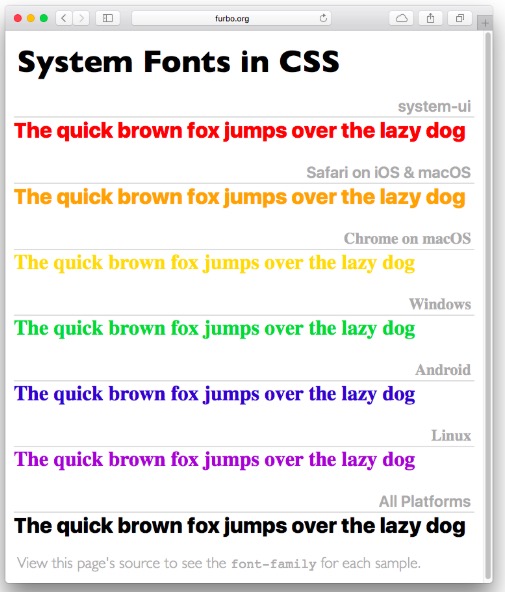
Operating systems play favorites when it comes to fonts: they pick one as their default. And the OS’s don’t agree with one another:

chart of system fonts
From https://furbo.org/stuff/systemfonts-new.html

But now when you’re designing a page you can tell CSS to use the system font of whatever operating system the browser is running on. This is thanks to Craig Hockenberry who proposed the idea in an article three years ago. Apple picked up on it, and now it’s worked it’s way into the standard CSS font module and is supported by Chrome and Safari; Windows and Mozilla are lagging. Here’s Craig’s write-up of the process.

Here’s a quick test of whether it’s working in the browser you’re reading this post with:

This sentence should be in this blog’s designated font: Georgia. Or maybe one of its serif-y fall-backs.

This one should be in your operating system’s standard font, at least if you’re using Chrome or Safari at the moment.

We now return you to this blog’s regular font, already in progress.

Tweet
Follow me

Categories: tech Tagged with: css • fonts • standards Date: October 12th, 2018 dw

Be the first to comment »

« Previous Page | Next Page »


Creative Commons License
This work is licensed under a Creative Commons Attribution-NonCommercial-ShareAlike 3.0 Unported License.
TL;DR: Share this post freely, but attribute it to me (name (David Weinberger) and link to it), and don't use it commercially without my permission.

Joho the Blog uses WordPress blogging software.
Thank you, WordPress!